
Annual Household employers are required to file the Employer of Household Worker(s) Quarterly Report of Wages and Withholdings (DE 3BHW) (wage report) on a quarterly basis and the Employer of Household Worker(s) Annual Payroll Tax Return (DE 3HW) (tax return) with the amount due annually. These forms can be corrected by submitting adjustments through e-Services for Business, even if the original tax return or wage report was filed via another filing method.
All employers are required to electronically submit employment tax returns, wage reports, and payroll tax deposits to the Employment Development Department. You can use e-Services for Business to comply with the e-file and e-pay mandate. For more information and approved electronic filing and payment methods, visit E-file and E-pay Mandate for Employers.
Please refer to the Household Employer’s Guide (DE 8829) (PDF) for additional filing and payment requirements for Annual Household Employers.
Refer to the following e-Services for Business resources for guidance on how to enroll, file, pay and submit adjustments on e-Services for Business:
Adjustments on e-Services for Business
If filing an adjustment to a previously filed tax return (DE 3HW) or wage report (DE 3BHW) through e-Services for Business, refer to the type of adjustment below to determine actions needed.
Adjust the Tax Return
- Access the tax return you need to correct and enter the correct amounts for the year.
After you submit your adjustment:
- If there is an overpayment on your account, the EDD will initiate the refund process.
- If taxes are due, select Make a Payment from the confirmation screen to pay the additional tax amount plus penalty and interest. The penalty amount is 15% of the portion of the payment that is late.
Adjust the Wage Report
- Access the wage report you need to correct and enter the correct amounts for the quarter.
- Clear any previously filed wage lines from the Wage Information section and include only the wage lines for the affected employee(s).
- Include the grand totals for all employees in the Amended Grand Totals.
Adjust the Wage Report
- Access the wage report you need to correct and enter the correct amounts for the quarter.
- Clear any previously filed wage lines from the Wage Information section and include only the wage lines for the employee(s) being added.
- Include the grand totals for all employees in the Amended Grand Totals.
Proceed to the tax return adjustment, if tax return for the year has been filed and needs correction.
Adjust the Tax Return
- Access the tax return you need to correct and enter the correct amounts for the year.
After you submit your adjustment:
- If there is an overpayment on your account, the EDD will initiate the refund process.
- If taxes are due, select Make a Payment from the confirmation screen to pay the additional tax amount plus penalty and interest. The penalty amount is 15% of the portion of the payment that is late.
Adjust the Wage Report
- Access the wage report you need to correct and enter the correct amounts for the quarter.
- Clear any previously filed wage lines from the Wage Information section and include only the wage lines for the affected employee(s) by making the following entries:
- Enter the employee's Social Security Number (SSN), First Name, Middle Initial, and Last Name.
- Enter zero (0.00) for Total Subject Wages, PIT wages, and PIT withheld.
- Select the Wage Plan Code previously reported.
- Include the grand totals for all employees in the Amended Grand Totals
Proceed to the tax return adjustment, if tax return for the Year has been filed and needs correction.
Adjust the Tax Return
- Access the tax return you need to correct and enter the correct amounts for the year.
After you submit your adjustment:
- If there is an overpayment on your account, the EDD will initiate the refund process.
- If taxes are due, select Make a Payment from the confirmation screen to pay the additional tax amount plus penalty and interest. The penalty amount is 15% of the portion of the payment that is late.
Adjust the Wage Report
- Access the wage report you need to correct and enter the correct amounts for the quarter.
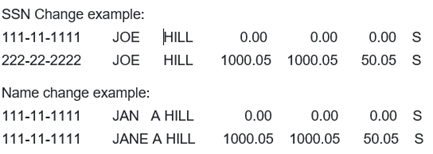
- Clear any previously filed wage lines from the Wage Information section and include only the wage lines for the affected employee(s). Correcting an employee’s SSN or name requires two entries for each employee, as follows:
First Entry:
-
- Enter the SSN and employee's First Name, Middle Initial, and Last Name as originally reported.
- Enter zero (0.00) for Total Subject Wages, PIT Wages, and PIT Withheld.
- Select the previously reported Wage Plan Code.
Second Entry:
-
- Enter the correct SSN, First Name, Middle Initial, and Last Name.
- Enter the Total Subject Wages, PIT Wages, PIT Withheld.
- Select the Wage Plan Code.
-
- Include the grand totals for all employees in the Amended Grand Totals.
Adjust the Wage Report
- Access the wage report you need to correct and enter the correct amounts for the quarter.
- Clear any previously filed wage lines from the Wage Information section and include only the wage lines for the affected employee(s). Adding an SSN for an employee previously reported without an SSN requires two entries for each employee, as follows:
First Entry:
-
- Enter all zeros (000-00-0000) for the SSN and the employee's First Name, Middle initial, and Last Name.
- Enter zero (0.00) for Total Subject Wages, PIT Wages, and PIT Withheld.
- Select the previously reported Wage Plan Code.
Second Entry:
-
- Enter the employee’s SSN, First Name, Middle Initial, and Last Name.
- Enter the Total Subject Wages, PIT Wages, and PIT Withheld.

-
- Include the grand totals for all employees in the Amended Grand Totals.
Refer to the Information Sheet: Reporting Wage Plan Codes on Quarterly Wage Reports and Adjustments (DE 231WPC) (PDF) for information on Wage Plan codes and which Wage Plan code corrections do not need to be reported.
Visit the e-Services for Business User Guide for instructions on how to adjust your previously filed DE 3HW or DE 3BHW.
Filing Adjustments on Paper Adjustment Forms
If filing an adjustment to a previously filed tax return (DE 3HW) or wage report (DE 3BHW) on paper, complete a Tax and Wage Adjustment Form (DE 678) (PDF). Refer to Correcting Previously Filed Reports and Returns page of the Household Employer’s Guide (DE 8829) (PDF) for the instructions for completing a paper DE 678. Refer to the Instructions for Completing the Tax and Wage Adjustment Form (DE 678-I) (PDF) for additional information.
Contact the Taxpayer Assistance Center at 1-888-745-3886 for further assistance.